


HD Video Downloader & Player
4.21.00 Reviews
App Specs
- Version
- 1.0.2
- Updated On
- License
- Free
- Downloads
- 1,000,000+
- Developer
- LKY Studio
- Categories
- Video Players & Editors
- Platform
- Android
Screenshots
 Analysis by AppCompare
For anyone who regularly saves videos to watch away from a dependable connection, HD Video Downloader & Player sounds appealing for a simple reason: it brings downloading and playback together. I like that focused idea, though I would judge it by how well it fits your own sources and viewing habits rather than assume every online video can be saved. It is a free video app from LKY Studio, aimed at people who want offline viewing without switching between separate tools.
Who will get the most from it
I see the clearest use for someone who already knows which videos they want to keep temporarily on their device: a tutorial for a trip, a permitted clip for a class, or a creator’s video that is available for download. Saving suitable content ahead of time can make a commute or a patchy connection less frustrating. It also means you can decide what to watch before leaving home instead of relying on a signal later.
A practical routine is to choose a small set of videos while connected to Wi-Fi, check that they have finished downloading, and then open them from the app when offline. That last check matters: a video that is still downloading, or one that was saved somewhere you cannot find quickly, is not much help on a train. I would also leave room on the device for the files rather than treating offline video as storage-free.
Choosing content with care
Downloader apps are not universal keys to every streaming service. Some websites permit downloads, while others restrict them or require their own offline feature. I would use this app only with content I am allowed to save and would not expect a pasted address to work for every site. If a platform’s official app offers offline viewing, that is usually the safer and more predictable choice for its own catalog.
This distinction is useful when planning a trip. Save public or personally owned videos through an allowed route, and use official downloads for subscription content where available. If a video will not download, trying the platform’s own option is more sensible than repeatedly pasting the same link or installing extra tools. The app’s value depends on compatible sources, not simply on whether a video plays in a browser.
How it fits among video apps
Compared with a basic media player, a downloader-and-player combination can reduce the handoff between finding a file and watching it. A standalone player may be a better fit if you already have a large local library and want specialized playback controls. A streaming service is more convenient when you want fresh recommendations or a broad catalog, but it depends on connectivity and its own download rules. This app makes most sense in the middle: for eligible files you want available offline.
That trade-off also shapes who should skip it. If you mainly stream at home over reliable Wi-Fi, a separate downloader may add little to your routine. If your priority is syncing a large collection across devices, a dedicated media library or cloud service may be more suitable. I would choose this app for straightforward local viewing, not as a replacement for every part of a streaming or media-management setup.
Worth Reading Before You Choose

EA SPORTS FC Mobile 26 Is a Bigger Football Game, but It Takes Time

Flipboard Shows What News Apps Must Do Beyond the Feed

Switching to Android Auto Means Rethinking Your Driving Routine

Google Calendar Makes a Crowded Week Easier to Manage

Ludo King Makes the Most of the Minutes Between Plans

Baby Panda World Brings Quick Play to Modern Phones, but Its Game Library Feels Busy
A Seamless Experience
First off, let’s talk about the installation. It’s smooth sailing from the get-go. You’ll find HD Video Downloader & Player on both the Play Store and App Store, and it barely takes up any space. Perfect for those of us constantly fighting with storage limits. Once you’ve got it set up, the interface is refreshingly simple. No unnecessary bells and whistles—just a straightforward design that gets you where you need to go.
Downloading Made Easy
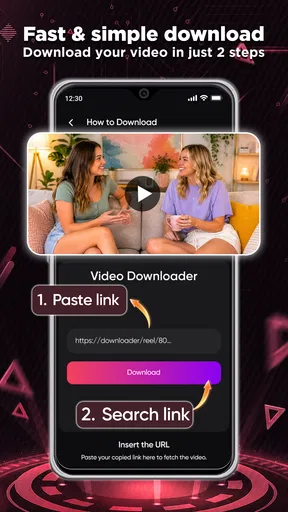
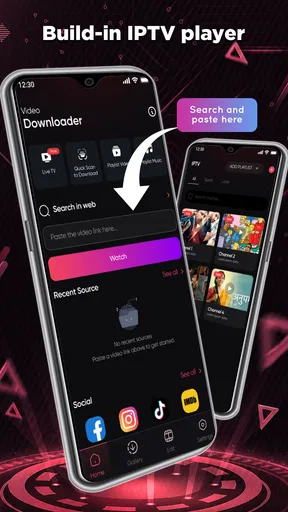
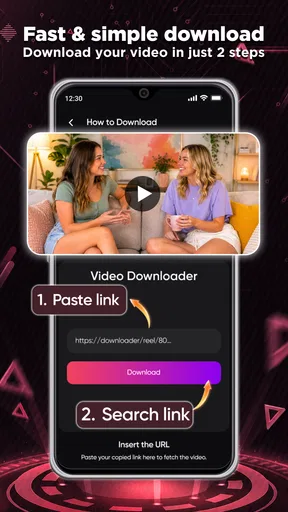
Now, onto the good stuff. This app makes downloading videos a breeze. All you need is the URL of the video, and voilà—your content is ready to go. Whether you’re pulling from social media or your favorite streaming site, it handles it all with aplomb. Plus, it supports a wide range of formats. So, whether it’s MP4, AVI, or something in between, you’re covered.
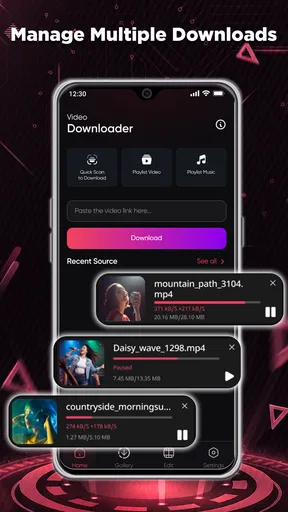
No more buffering while you’re on the go. Just download your videos when you’re on Wi-Fi and watch them whenever, wherever. The app even allows for batch downloads, which is a lifesaver when you’re prepping for a long trip or just want to stockpile entertainment.
Making downloads work for your routine
Batch downloading is most useful when you treat it as preparation rather than a reason to save everything. I would make a short queue for a specific need—a few lessons for a study session, for example—and check the available storage before starting. This keeps the downloads manageable and makes it easier to locate the file you actually want. It also avoids the annoyance of arriving somewhere offline only to discover that a large queue is incomplete.
When a link fails, I would first check whether the source allows downloading and whether the address points directly to a video rather than a page that embeds one. That simple distinction can save time. A URL-based workflow is convenient when it works, but it is less direct than choosing an offline button inside a service that controls its own content. Keeping those two routes in mind helps set realistic expectations.
A Player That Delivers
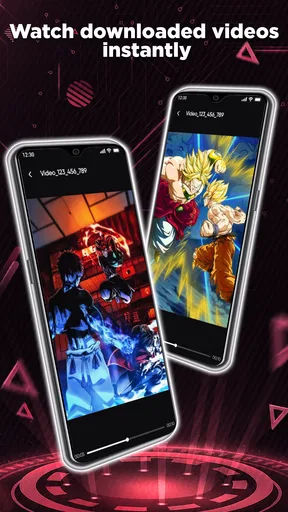
But wait, there’s more! The player itself is top-notch. It supports HD playback, ensuring that you’re getting the best viewing experience possible. I was impressed by how smoothly it handled even large files. And the best part? The app doesn’t drain your battery like some other players out there.
- Subtitle support is another nifty feature. Whether you’re watching international films or just need a little extra help following along, adding subtitles is a cinch.
- The app also offers convenient options to adjust playback speed, which is perfect for those times when you’re trying to power through a lecture or slow down to catch every detail in a tutorial.
Getting more from playback
Playback speed is particularly handy for material where the goal is understanding rather than simply filling time. I would use a slower setting for a quick demonstration with small on-screen steps, then return to normal speed for ordinary viewing. For lectures, modestly faster playback can help with review, but speeding through unfamiliar material may make it harder to absorb. The useful choice is being able to change pace to suit the video, not assuming one setting is right for everything.
Subtitles can also make a saved video easier to use in shared spaces, where turning up the volume is not practical. Before setting off, I would test the subtitle file with the video at home; checking it in advance is more convenient than troubleshooting while offline. These small preparations are especially worthwhile for language lessons and travel viewing, where clear dialogue can matter more than picture quality alone.
Security and Privacy
In today’s digital age, security is a big deal. Thankfully, HD Video Downloader & Player has you covered. It doesn’t store any of your personal data, so you can download with confidence. It’s also free of those annoying pop-up ads that seem to plague so many other apps. No more interruptions while you’re trying to enjoy your content.
And for the privacy-conscious among us, rest easy knowing that the app doesn’t require unnecessary permissions. It sticks to what it needs to get the job done and nothing more.
What to check before relying on it
I would still keep sensible expectations around privacy and file handling. Downloaded videos are local files, so anyone with access to the device may be able to find them through its media tools or file storage. If you save personal material, use the device’s own screen lock and avoid sharing files casually. For public or shared devices, I would be more cautious about leaving downloads behind.
It is also worth checking the app’s current behavior on your own device before depending on it for an important trip. A brief test with one permitted video confirms that the source works, playback is comfortable, and the file is easy to locate. That is a more reliable plan than building a large offline collection at the last minute.
User-Friendly Features
The app also comes with some thoughtful features to enhance your experience. There’s a built-in file manager to keep your downloads organized, and it integrates seamlessly with your device’s existing media library. You can easily share your downloaded content with friends or across your devices without any hassle.
"Finally, an app that understands my needs!" – That’s what I found myself thinking as I navigated through the various features.
Its current place and what may change
LKY Studio’s video app has an average rating of 4.2 from 861 ratings, with 1M+ installs. It is free, rated for Everyone, and version 1.0.2 is the current release. Those figures suggest that it has reached a sizeable audience, but they do not tell me whether a particular website will work for you; source compatibility is still the practical test that matters most.
The app was released on April 28, 2026, and its current version gives users a clear point of reference when discussing what they are using. I would not infer a specific history of improvements from that alone. For someone already using it, the useful approach is to check the version shown on their device and update through the store when an update is available, then confirm that familiar download and playback routines still work as expected.
On Android, the stated minimum operating-system requirement is version 7.0. If you are choosing between this and a device’s built-in player, the built-in option may be enough for files you already own. If you want one place to handle eligible downloads and play them afterward, this app’s combined purpose is the stronger reason to try it. I would keep an eye on future releases for changes to source compatibility and everyday file handling, but treat those as things to evaluate when they appear, not promises about what the app will do next.
Final Thoughts
I’ve tried a fair share of video downloaders and players, and I have to say, this one stands out. With its easy-to-use interface, reliable performance, and thoughtful features, HD Video Downloader & Player has quickly become one of my top recommendations. Whether you’re a frequent traveler, a binge-watcher, or just someone who appreciates a good app, this is definitely worth a download.
So, give it a whirl, and let me know what you think. Happy downloading!
Pros
- Supports multiple video formats seamlessly.
- Fast download speeds for large files.
- User-friendly interface with intuitive navigation.
- Built-in media player for offline viewing.
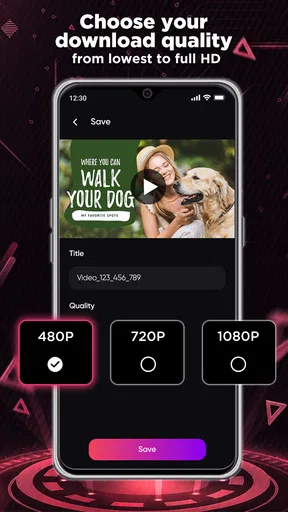
- Option to download in various resolutions.
Cons
- Contains intrusive ads during use.
- Limited support for certain streaming sites.
- Requires permissions that may concern privacy.
- Occasional crashes on older devices.
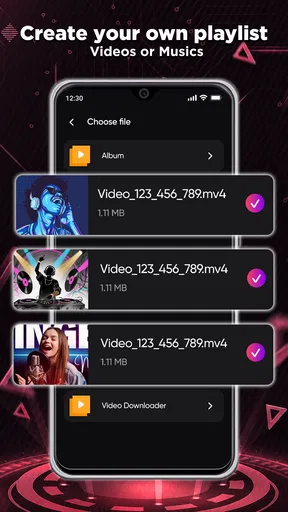
- No playlist management for downloaded videos.
FAQs for HD Video Downloader & Player
Is HD Video Downloader & Player free to use?
Yes, HD Video Downloader & Player is free to download and use. However, it may contain in-app purchases or ads that can be removed with a premium subscription. Users can enjoy basic features without any cost, but advanced features might require a payment.
Can I download videos from any website using this app?
While HD Video Downloader & Player supports a wide range of websites for video downloading, it may not work with every site due to legal restrictions and website policies. Always ensure that you have permission to download content and comply with the terms of service of the sites you are using.
What video formats does the app support?
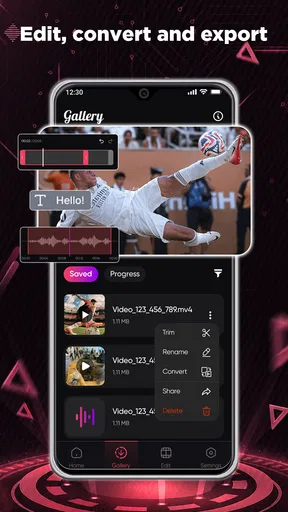
HD Video Downloader & Player supports a variety of video formats including MP4, AVI, MKV, and more. This allows users to download and play videos in their preferred format. The app also offers conversion features to switch between formats if needed.
Is my downloaded content stored securely?
The app ensures that all downloaded content is stored locally on your device, providing a certain level of privacy. However, users should always ensure their device is secure and consider using additional security measures like password protection or encryption for sensitive content.
Does the app offer offline playback?
Yes, HD Video Downloader & Player allows offline playback of downloaded videos. This feature is perfect for users who want to watch videos without an internet connection, making it ideal for travel or areas with limited connectivity.


